
Wmlink is Walmart’s internal employee portal, accessible at wmlink/2step from within Walmart’s network or through authorized remote access. The two-step verification layer was introduced to add a second authentication checkpoint beyond just a username and password. When it works correctly, the system sends a code to your registered phone number or authenticator app, and you enter that code to confirm your identity.
The purpose is straightforward. Walmart handles sensitive payroll information, scheduling data, HR records, and benefits enrollment through this system. A second authentication layer prevents unauthorized access even if someone has stolen or guessed a password. However, any system that depends on real-time code delivery and synchronized time-based tokens has failure points, and Wmlink 2-step has several that show up regularly.
The Most Common Reasons Wmlink 2Step Stops Working

Your Phone Number or Email Is No Longer on File
This is the most frequent culprit. If you got a new phone number, changed carriers, or updated your contact information without also updating your Walmart associate profile, the verification code is going somewhere you no longer have access to. Many associates do not realize their profile still has an old number listed until they are locked out.
You Are Not on Walmart’s Network
The Wmlink portal is primarily designed to work from within Walmart’s internal network. If you are trying to access it from home without the proper remote access setup, you may get authentication errors that look like a 2-step failure but are actually a network access issue. Walmart uses a specific VPN and network gateway for remote associate access, and bypassing that process will prevent the portal from functioning correctly.
The Verification Code Is Expiring Before You Enter It
Time-based one-time passwords have a short validity window, typically 30 to 60 seconds. If there is a delay in receiving the SMS or if your authenticator app’s clock is out of sync with the server, the code you enter will already be invalid. This is especially common with SMS-based codes in areas with slow carrier delivery, or with authenticator apps that have not been recalibrated in a while.
Your Account Has Been Locked After Too Many Failed Attempts
Walmart’s system will lock an account temporarily after a certain number of consecutive failed login attempts. If you or someone else has entered incorrect credentials or codes repeatedly, the system may have placed a temporary block on the account. This is a security feature, not a bug, but it can feel like the system is broken when you are the one locked out.
Browser Issues, Cached Data, and Outdated Sessions
Old cookies and cached login sessions can interfere with the authentication process. If your browser is holding onto a partially completed session from a previous login, it may conflict with the new 2-step flow. This is easy to reproduce: if you logged in once without completing verification, or if the portal timed out mid-process, your browser may be stuck in a loop.
Step by Step Fixes to Try Right Now
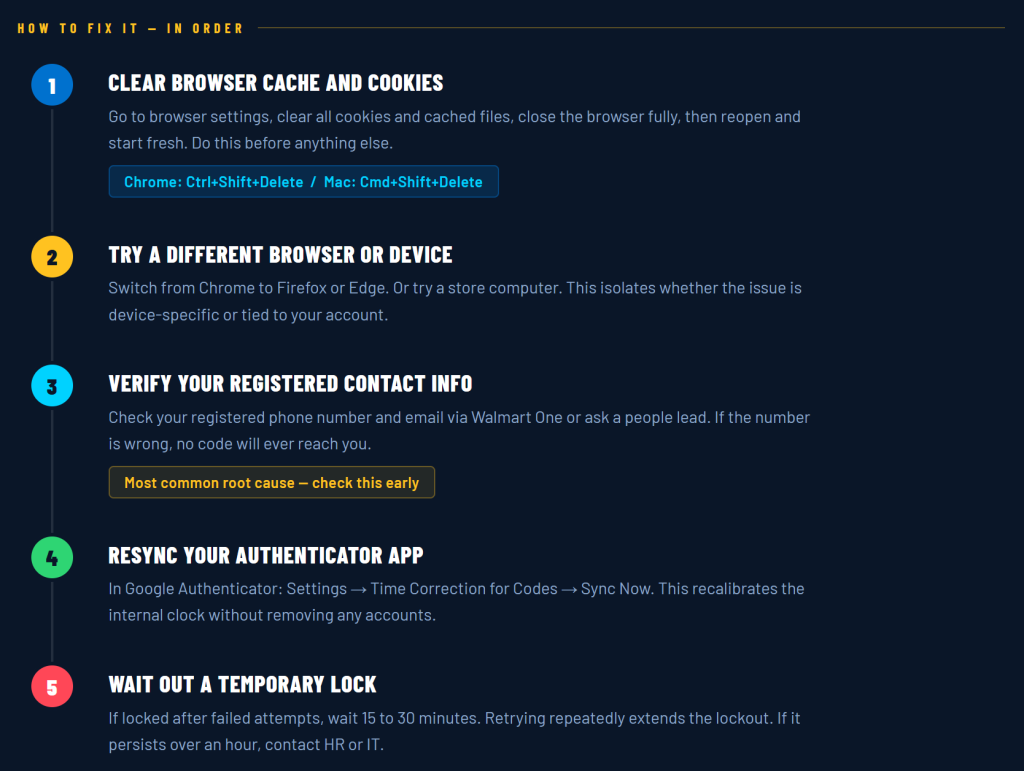
Clear Your Browser Cache and Cookies
Start here before anything else. Open your browser settings, go to privacy or history, and clear all cookies and cached files. Then close the browser completely, reopen it, and try the login process again from scratch. If you are on Chrome, you can press Ctrl+Shift+Delete on Windows or Command+Shift+Delete on Mac to open the clear browsing data panel directly.
Try a Different Browser or Device
If clearing the cache does not help, switch browsers. If you were using Chrome, try Firefox or Edge. If you were on a personal laptop, try the login from a store computer or a different device. This step helps isolate whether the problem is device-specific or tied to your account.
Check Your Registered Contact Information
You can verify or update your registered phone number and email address through the Walmart One portal or by speaking with a people lead or store manager. If your number is outdated, they can help you get it corrected in the system. Until the correct number is on file, no amount of code-requesting will help because the codes are going to the wrong destination.
Resync Your Authenticator App
If you are using an authenticator app like Google Authenticator or Microsoft Authenticator, check whether the app’s time sync is accurate. In Google Authenticator, go to settings, then select Time Correction for Codes, and tap Sync Now. This recalibrates the app’s internal clock against Google’s servers without requiring you to remove and re-add any accounts.
Wait Out a Temporary Account Lock
If your account has been locked due to too many failed attempts, the fastest fix is simply waiting. Most temporary locks clear after 15 to 30 minutes. Trying again repeatedly will not speed up the process and may extend the lockout period. If the lock persists beyond an hour, contact Walmart’s associate support or speak with your store’s HR contact.
When to Contact Walmart Support Directly
If none of the above steps restore your access, the issue is likely on the account administration side. Walmart associates have a few support channels available. The Global People Center can be reached at 1-800-421-1362, and representatives there can reset 2-step verification settings and verify what contact information is associated with your account. You can also work with your facility’s people lead to submit an IT support request if the issue appears to be a system-side problem affecting multiple associates.
Do not attempt to work around the 2-step system by sharing credentials or using a coworker’s login. Beyond being a policy violation, it creates real security risks for your account and theirs.
Preventing This Problem Going Forward
The easiest way to avoid being locked out again is to keep your contact information current in the Walmart system. Any time you change phone numbers or email addresses, update your associate profile before the old information becomes inaccessible. It also helps to use an authenticator app rather than relying solely on SMS codes, since app-based codes are faster and not dependent on carrier network delays.
Logging into Wmlink at least once every few weeks also prevents your session and authentication tokens from going stale. Associates who only log in during open enrollment or annual reviews are far more likely to encounter authentication issues than those who use the portal regularly.
Wmlink 2-step verification exists to protect your pay, benefits, and personal records. When it stops working, the cause is almost always something correctable at the device, browser, or account level. Work through the fixes in order, keep your information updated, and you should rarely encounter this problem more than once.