If you’ve recently received a message from Walmart asking you to visit wmlink/2step, you’re not alone. Many Walmart customers and associates see this link when logging in or updating their accounts. It’s part of Walmart’s security system designed to protect your account from unauthorized access.
In this guide, I’ll explain in simple terms what wmlink/2step means, why Walmart uses it, and exactly how to set up 2-step verification on your Walmart account — step by step.
What is wmlink/2step?
wmlink/2step is Walmart’s official shortcut link that redirects users to the Walmart 2-Step Verification setup page.
In plain words:
It’s the page where you add an extra security layer to your Walmart account.
So instead of logging in with only your password, Walmart will also ask for a temporary code sent to your phone or email.
This security method is also known as:
- Two-Step Verification
- 2FA (Two-Factor Authentication)
- Multi-Factor Authentication (MFA)
All these terms mean the same thing — extra login protection.
Walmart 2SV Quick Overview
| Details | Information |
|---|---|
| Organization | Walmart |
| Portal | OneWalmart |
| Official Website | https://one.walmart.com |
| Purpose | Secure associate login |
| Setup Link | https://wmlink.wal-mart.com/enrollnow |
| Support Number | 479-273-4357 |
Important Tip:
You must be connected to the Walmart network inside your store or club to complete the initial setup.
You cannot enroll for the first time using a home internet connection.
Why Walmart Uses 2-Step Verification
Online accounts are constantly targeted by hackers. If someone guesses or steals your password, they could access your Walmart account, payment methods, or personal information.
2-step verification stops that.
Even if someone knows your password, they still cannot log in without the verification code sent to your phone or email.
That’s why Walmart strongly encourages customers and employees to enable it.
Who Needs to Use wmlink/2step?
You may be asked to set up Walmart 2-step verification if you:
- Sign in from a new device
- Reset your Walmart password
- Access Walmart employee systems
- Update security settings
- Log in after long inactivity
- Use Walmart One / associate portal
So if you see wmlink/2step, it’s normal and safe.
How to Set Up Walmart 2-Step Verification (wmlink/2step)
Here’s the easiest way to set it up.
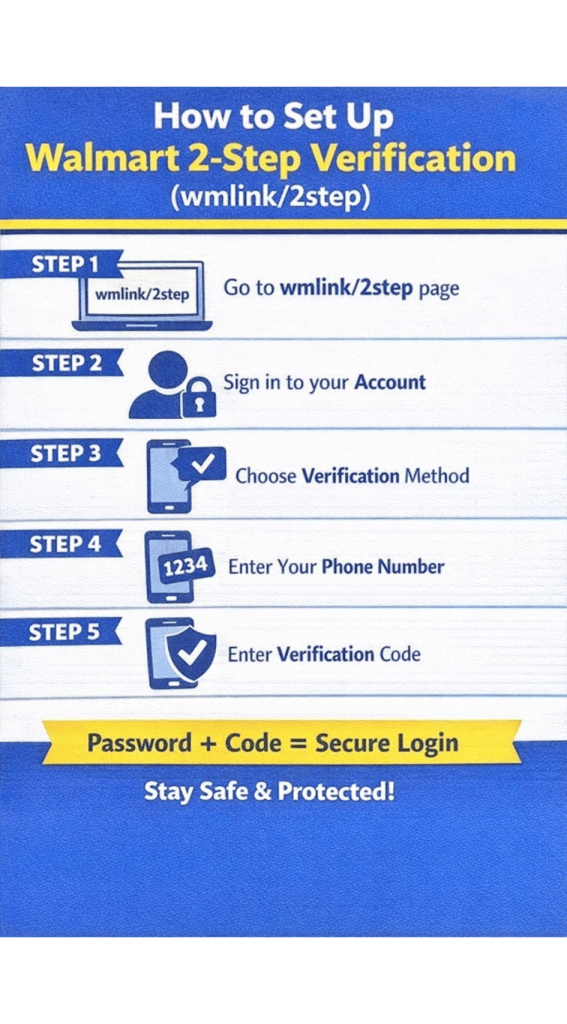
Step 1: Open the 2-Step Verification Page
Go to the official Walmart security setup page:
You’ll be redirected to Walmart’s login/security page.
Step 2: Sign In to Your Walmart Account
Enter:
- Email or Walmart ID
- Password
Then click Sign In.
Step 3: Choose Verification Method
Walmart will ask how you want to receive codes.
Usually options include:
- Text message (SMS)
- Phone call
- Authenticator app
- Email code
Most people choose SMS text message because it’s easiest.
Step 4: Enter Your Phone Number
Type your mobile number and confirm it.
Walmart will send a one-time code to verify that the number belongs to you.
Step 5: Enter the Verification Code
Check your phone for the code and enter it on the screen.
Once verified, 2-step verification is activated.
How Walmart 2-Step Verification Works After Setup
After enabling it, each login may ask for:
- Your password
- A temporary code sent to your phone
So the login process becomes:
Password + Code = Secure access
This prevents unauthorized logins.
Can You Turn Off Walmart 2-Step Verification?
Yes, but it’s not recommended.
To disable:
- Go to Walmart account settings
- Open Security settings
- Find 2-Step Verification
- Click Remove or Turn Off
However, turning it off makes your account less secure.
Is wmlink/2step Safe?
Yes — wmlink/2step is an official Walmart security link.
But always make sure:
- You’re on a Walmart website
- The page shows Walmart branding
- The URL redirects to Walmart domain
Never enter your password on suspicious links.
Common Problems with Walmart 2-Step Verification
Here are some issues people face and how to fix them.
Not receiving verification code
Try:
- Checking signal/network
- Waiting 30–60 seconds
- Requesting new code
- Switching to call option
Changed phone number
You must update your number in Walmart account settings or contact Walmart support.
Lost access to phone
Use backup verification method (email or authenticator) or contact Walmart support.
Benefits of Enabling Walmart 2-Step Verification
There are clear advantages:
- Protects payment details
- Stops unauthorized purchases
- Prevents account takeover
- Secures personal information
- Required for some Walmart systems
It’s one of the easiest ways to keep your account safe.
FAQs About wmlink/2step
What is wmlink/2step Walmart?
It’s Walmart’s official link for setting up 2-step verification on your account.
Why is Walmart asking me to verify my account?
Usually because you logged in from a new device, changed password, or accessed sensitive settings.
Is Walmart 2-step verification required?
For employees and some accounts, yes. For customers, it’s strongly recommended.
Can I use email instead of phone?
Yes, if Walmart provides email verification option in your account.
What if I don’t complete wmlink/2step?
You may be blocked from login or asked repeatedly until verification is finished.
If you see wmlink/2step, don’t worry — it’s simply Walmart’s way of keeping your account safe.
Setting up 2-step verification takes less than two minutes but greatly reduces the risk of hacking or unauthorized access.
For anyone using Walmart online accounts — especially employees or frequent shoppers — enabling this feature is a smart and necessary step.
Quick Summary
- wmlink/2step = Walmart 2-step verification page
- Adds extra login security
- Requires code after password
- Easy to set up in minutes
- Protects your account